• XonTel PBX Manager
    • PBX V 1.X.X
      • Overview
        • Installation
          • PBX ISO Installation on ESXi
        • License Activation & Verification
        • Log in to the PBX
      • System
        • Authentication
          • Users
          • Groups
          • Permissions
        • Network
          • Network Interface
          • Network Routes
          • Network Host
          • Static Routes
          • Diagnostic Tools
        • Host Name
        • Email
        • Security
          • IP Tables
          • Fail2ban
        • Dynamic DNS
        • VPN
          • Open VPN
          • SSTP
        • Maintenance
        • LDAP
      • PBX
        • Extensions
        • Trunks
        • Call controls
          • Inbound Routes
          • Outbound Routes
          • Time Conditions
          • Auto CLIP
        • Call Features
          • IVR
          • Ring Group
          • Queue
          • Paging/Intercom
          • Blacklist
        • Voice Prompts
        • Music On Hold
        • NAT
        • Status
        • CDR
        • Feature Code
        • Recording Storage
        • Transport
      • Event Center
        • Session Timeout
        • Activity Log
    • PBX V 2.X.X
      • Overview
        • Installation
          • PBX ISO Installation on ESXi
        • License Activation & Verification
        • Log in to the PBX
      • Dashboard
      • Extensions
      • Trunks
      • PBX Features
        • Call Features
          • IVR
          • Ring Group
          • Paging/Intercom
          • Blacklist
        • Call controls
          • Inbound Routes
          • Outbound Routes
          • Time Conditions
          • Auto CLIP
        • Feature Code
  • كول سنتر زونتل
    • Call Center V 1.X.X
      • Overview
        • Installation
        • Log in to the call center
        • License Activation & Verification
      • Dashboard
        • Agent Insights
        • Inbound calls
        • Outbound calls
        • My Dashboard
      • Call Center Management
        • Missed Call Actions
          • Missed Calls Actions History
          • Missed Call Actions
          • Missed Calls Actions Logs
        • Type of Break
        • Widgets
        • CDRs
        • CDR Survey Questions
        • Queues
        • Queue Logs
        • Queues Evaluation
        • Trunk
        • External Lookup
      • Contacts Management
        • Contacts
        • Contact Groups
        • Companies
        • Contact Custom fields
        • Customer Journey
      • Authentication
        • Users
          • Admin
          • Supervisor
          • Agent
        • Groups
        • Permissions
        • Add End User
      • Applications
        • Ticket Managements
          • Categories
            • Sub Categories
          • Create Ticket
          • Tickets List
          • Reminder Settings
          • Dashboards
          • Ticket Statistics
          • Tickets CCs
          • Follow Up
          • Custom Fields
          • Notifications Templates
          • Ticket Logs
        • SMS
          • SMS Message
          • Bulk SMS
          • SMS Templates
        • Email Management
          • Outgoing Emails
          • Incoming Emails
          • Attachments
          • Templates
          • Teams
        • Auto Dialer
          • Dial Teams
          • Auto Dialer Log
          • Auto Dialer Status
        • Web Chat
          • Dashboard
          • Offline Messages
          • Web Chat Logs
        • Queue Evaluation
          • Queues Evaluation Level
          • Queues Evaluation
        • Social Media
          • Social Media Teams
          • Social Media Sessions Tracker
          • WhatsApp
        • Agent Chat
      • Reports
        • Generate Reports
      • Settings
        • Site Administration
        • Email Settings
        • Email Channel Mailbox
        • Email Channel Outbox
        • Email Logger
        • Web Chat Settings
        • SMS Gateway
        • ODBC Settings
        • System Parameters
        • Updates
        • Https Certification
        • Web Phone Configuration
        • Web Logo Settings
        • End User Logo
      • Block
        • Blocked Word
        • Block Settings
      • Status
      • Session Control
      • Activity Log
    • Call Center V 2.X.X

Time Conditions

9 views 0

Written by xontel_admin
يوليو 4, 2026

The Time Conditions section is used to manage time-based routing rules for incoming calls. Time conditions allow administrators to route calls differently based on defined schedules, such as business hours, after-hours periods, weekends, or holidays.

Add Time Conditions

The Add Time Condition section is used to create a new schedule-based routing rule.

Basic Info

The Basic Info tab defines the main routing behavior for the time condition.
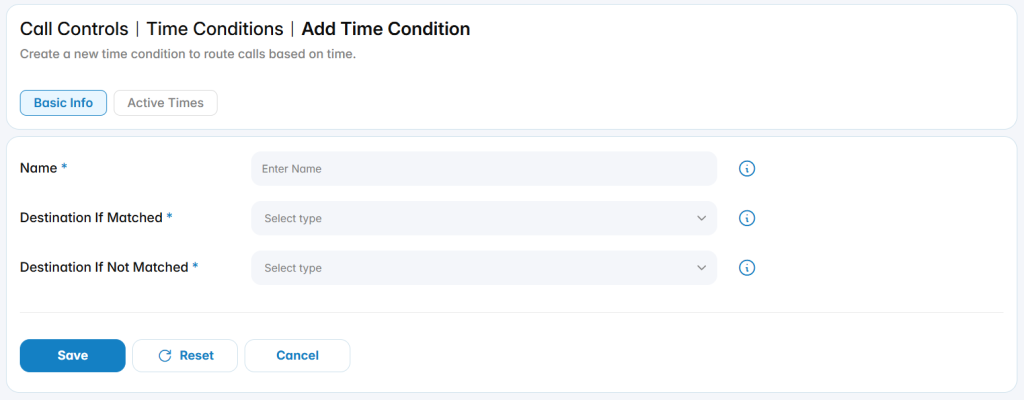
Name: Defines the name used to identify the time condition.

Destination If Matched: Defines where calls are routed when the active time schedule is matched.

Destination If Not Matched: Defines where calls are routed when the active time schedule is not matched.

Active Times

The Active Times tab is used to define the schedule during which the time condition is considered active.
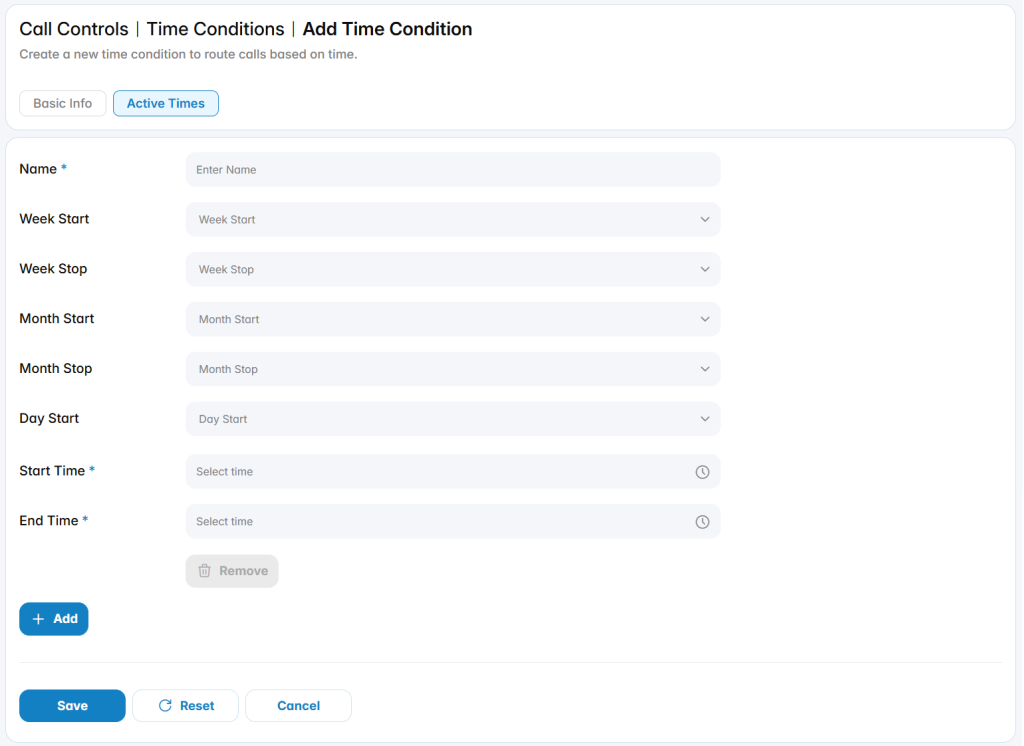
You can configure multiple Active Times under a single Time Condition to cover different schedules or scenarios.

Was this helpful?

Yes  No

Didn't find your answer? تواصل معنا

Previously
Outbound Routes
Up Next
Auto CLIP
  • Copyright 2026 SmartWpThemes.com. All Rights Reserved