• XonTel PBX Manager
    • PBX V 1.X.X
      • Overview
        • Installation
          • PBX ISO Installation on ESXi
        • License Activation & Verification
        • Log in to the PBX
      • System
        • Authentication
          • Users
          • Groups
          • Permissions
        • Network
          • Network Interface
          • Network Routes
          • Network Host
          • Static Routes
          • Diagnostic Tools
        • Host Name
        • Email
        • Security
          • IP Tables
          • Fail2ban
        • Dynamic DNS
        • VPN
          • Open VPN
          • SSTP
        • Maintenance
        • LDAP
      • PBX
        • Extensions
        • Trunks
        • Call controls
          • Inbound Routes
          • Outbound Routes
          • Time Conditions
          • Auto CLIP
        • Call Features
          • IVR
          • Ring Group
          • Queue
          • Paging/Intercom
          • Blacklist
        • Voice Prompts
        • Music On Hold
        • NAT
        • Status
        • CDR
        • Feature Code
        • Recording Storage
        • Transport
      • Event Center
        • Session Timeout
        • Activity Log
    • PBX V 2.X.X
      • Overview
        • Installation
          • PBX ISO Installation on ESXi
        • License Activation & Verification
        • Log in to the PBX
      • Dashboard
      • Extensions
      • Trunks
      • PBX Features
        • Call Features
          • IVR
          • Ring Group
          • Paging/Intercom
          • Blacklist
        • Call controls
          • Inbound Routes
          • Outbound Routes
          • Time Conditions
          • Auto CLIP
        • Feature Code
      • Voice & Audio
        • Voice Prompts
        • Music On Hold
        • Language
      • Queues
        • Queue List
      • CDRs
      • SIP Settings
        • NAT
        • Transport
      • System
        • Network
          • Network Interface
          • Network Routes
          • Network Host
          • Static Routes
          • Diagnostic Tools
        • VPN
          • Open VPN
          • SSTP
        • Dynamic DNS
        • SMTP Settings
        • Host Name
        • LDAP
        • Session Timeout
        • Storage
      • Security
        • Firewall
  • كول سنتر زونتل
    • Call Center V 1.X.X
      • Overview
        • Installation
        • Log in to the call center
        • License Activation & Verification
      • Dashboard
        • Agent Insights
        • Inbound calls
        • Outbound calls
        • My Dashboard
      • Call Center Management
        • Missed Call Actions
          • Missed Calls Actions History
          • Missed Call Actions
          • Missed Calls Actions Logs
        • Type of Break
        • Widgets
        • CDRs
        • CDR Survey Questions
        • Queues
        • Queue Logs
        • Queues Evaluation
        • Trunk
        • External Lookup
      • Contacts Management
        • Contacts
        • Contact Groups
        • Companies
        • Contact Custom fields
        • Customer Journey
      • Authentication
        • Users
          • Admin
          • Supervisor
          • Agent
        • Groups
        • Permissions
        • Add End User
      • Applications
        • Ticket Managements
          • Categories
            • Sub Categories
          • Create Ticket
          • Tickets List
          • Reminder Settings
          • Dashboards
          • Ticket Statistics
          • Tickets CCs
          • Follow Up
          • Custom Fields
          • Notifications Templates
          • Ticket Logs
        • SMS
          • SMS Message
          • Bulk SMS
          • SMS Templates
        • Email Management
          • Outgoing Emails
          • Incoming Emails
          • Attachments
          • Templates
          • Teams
        • Auto Dialer
          • Dial Teams
          • Auto Dialer Log
          • Auto Dialer Status
        • Web Chat
          • Dashboard
          • Offline Messages
          • Web Chat Logs
        • Queue Evaluation
          • Queues Evaluation Level
          • Queues Evaluation
        • Social Media
          • Social Media Teams
          • Social Media Sessions Tracker
          • WhatsApp
        • Agent Chat
      • Reports
        • Generate Reports
      • Settings
        • Site Administration
        • Email Settings
        • Email Channel Mailbox
        • Email Channel Outbox
        • Email Logger
        • Web Chat Settings
        • SMS Gateway
        • ODBC Settings
        • System Parameters
        • Updates
        • Https Certification
        • Web Phone Configuration
        • Web Logo Settings
        • End User Logo
      • Block
        • Blocked Word
        • Block Settings
      • Status
      • Session Control
      • Activity Log
    • Call Center V 2.X.X

Email Channel Outbox

43 views 0

Written by xontel_admin
مايو 22, 2025

The Email Channel Outbox allows you to manage the outgoing email servers used by your system to send notifications, ticket responses, and other system emails.
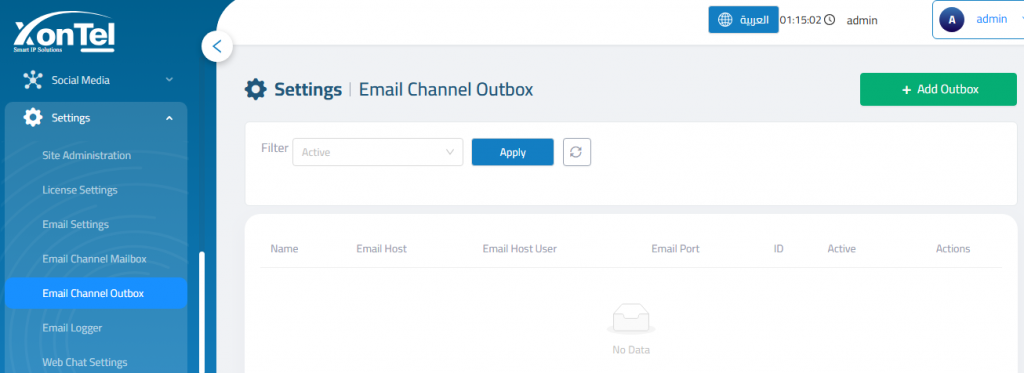
Add Outbox
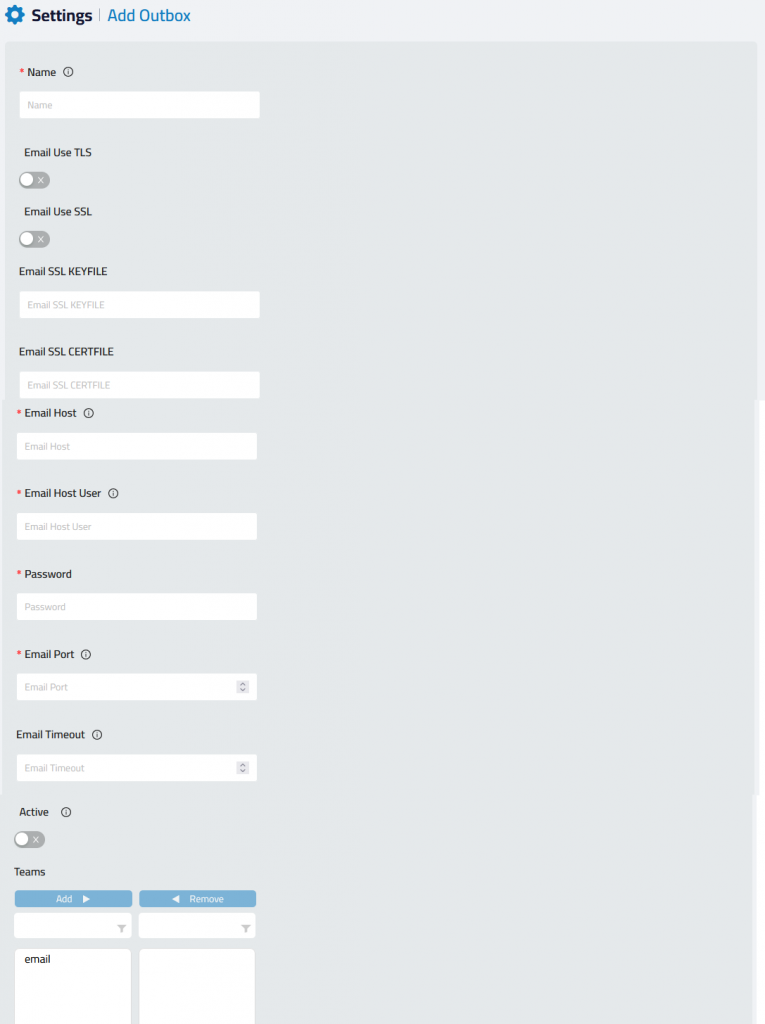
Name: A unique name to identify the outbox configuration.

Email Use TLS: Enable if your server uses TLS encryption (commonly port 587).

Email Use SSL: Enable for SSL encryption (commonly port 465).

Email SSL KEYFILE: Path to SSL private key file (only if SSL is enabled).

Email SSL CERTFILE: Path to SSL certificate file (only if SSL is enabled).

Email Host: The SMTP server address (e.g., smtp.gmail.com).

Email Host: UserEmail address or username used to log in.

Password: Email account or app-specific password.

Email Port: SMTP port number (e.g., 587 for TLS, 465 for SSL).

Email Timeout :Optional time limit (in seconds) for sending operations.

Active: toggle must be enabled for the outbox to be used by the system.

Teams: Use the Teams to specify which teams can use this outbox for sending emails.

Note: Multiple email accounts can be added.

Was this helpful?

Yes  No

Didn't find your answer? تواصل معنا

Previously
Email Channel Mailbox
Up Next
Email Logger
  • Copyright 2026 SmartWpThemes.com. All Rights Reserved