
The Missed Call Management feature allows administrators to define what the system should do when a call is missed.
Missed Call Actions
From the Missed Call Actions page, you can enable one or more actions to automatically handle missed calls. Multiple actions can be enabled at the same time, allowing the system to perform several follow-up tasks for the same missed call.
Available actions include:
- Calling the missed caller back.
- Sending an SMS message.
- Sending an email.
- Sending the missed-call information to an external URL using HTTP.
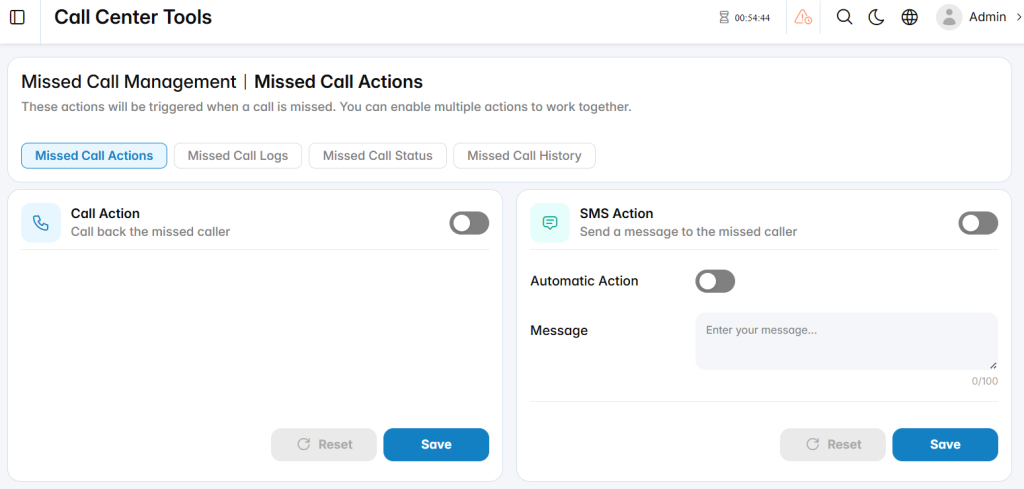
Call Action
The Call Action option allows the system to call back the number associated with the missed call.
Enable Call Action
Use the toggle beside Call Action to enable or disable the feature.
When enabled, the system can trigger a callback for missed callers according to the Missed Call Management workflow.
SMS Action
The SMS Action option allows the system to send an SMS message to the missed caller.
Enable SMS Action
Use the main toggle beside SMS Action to enable or disable SMS processing for missed calls.
Automatic Action
Enable Automatic Action when the SMS should be sent automatically after the missed call is detected.
If automatic processing is disabled, the action can be handled according to the configured Missed Call Management workflow instead of being triggered immediately.
Message
Enter the SMS message that will be sent to the missed caller.
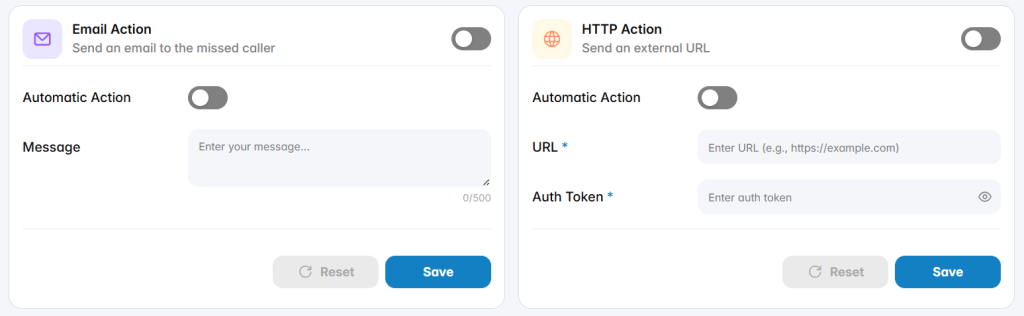
Email Action
The Email Action option allows the system to send an email related to the missed call.
Enable Email Action
Use the main toggle beside Email Action to enable or disable the email action.
Automatic Action
Enable Automatic Action when the email should be sent automatically after the missed call is detected.
Message
Enter the message that should be included in the email.
HTTP Action
The HTTP Action allows the system to send missed-call information to an external system through a configured URL.
This option can be useful when integrating Missed Call Management with external applications such as:
- CRM systems
- Ticketing platforms
- Workflow automation systems
- Custom applications
- External notification services
Enable HTTP Action
Use the main toggle beside HTTP Action to enable or disable the integration.
Automatic Action
Enable Automatic Action when the HTTP request should be triggered automatically after a missed call is detected.
URL
Enter the external endpoint that should receive the HTTP request.
Missed Call Logs
The Missed Call Logs page provides a detailed record of missed-call events and the actions triggered for each event.
Administrators and supervisors can use this page to review how missed calls were processed, identify which actions were executed, and verify when and by whom an action was created.
Missed Call Status
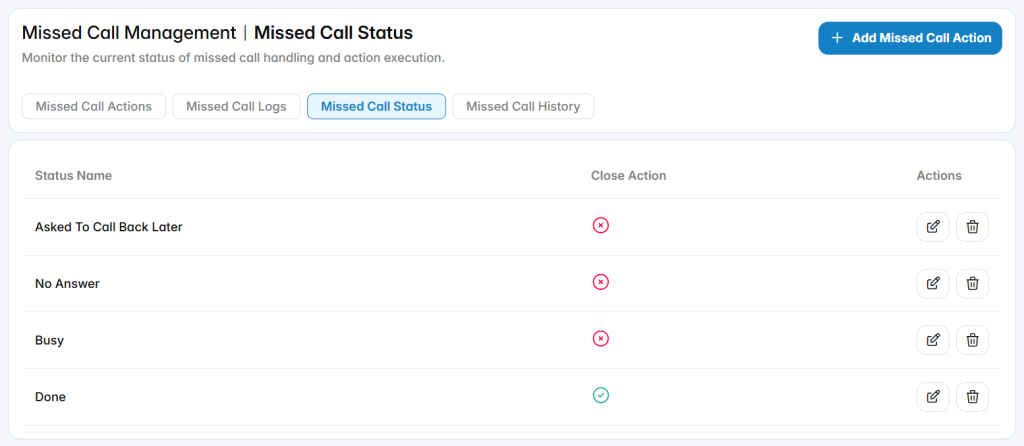
The Missed Call Status page allows administrators or supervisors to create and manage the statuses used when handling missed calls.
These statuses help agents classify the current state or outcome of a missed call, such as:
- Asked To Call Back Later
- No Answer
- Busy
- Done
The configured statuses are available to agents when they handle missed calls from My Dashboard → Missed Calls.
Add Missed Call Status
The Add Missed Call Status page allows administrators or supervisors to create a new status that agents can select when handling missed calls.
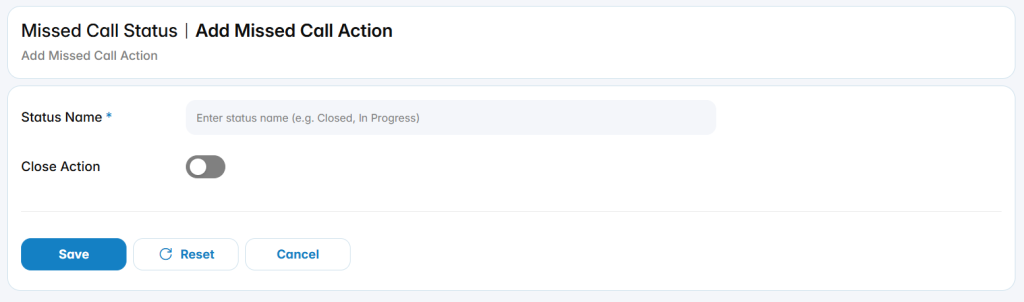
Status Name: Enter a clear name that describes the result or current state of the missed-call follow-up.
Close Action: option determines whether this status should close the missed-call handling process.
Missed Call History
The Missed Call History page provides a historical view of missed calls that have been assigned to agents and processed through the Missed Call Management workflow.
Supervisors and administrators can use this page to review missed-call assignments, check the current or final status of each call, and open the detailed history of actions performed on a specific missed call.