• XonTel Platform
    • XonTel PBX Manager
      • PBX V 1.X.X
        • Overview
          • Installation
            • PBX ISO Installation on ESXi
          • License Activation & Verification
          • Log in to the PBX
        • System
          • Authentication
            • Users
            • Groups
            • Permissions
          • Network
            • Network Interface
            • Network Routes
            • Network Host
            • Static Routes
            • Diagnostic Tools
          • Host Name
          • Email
          • Security
            • IP Tables
            • Fail2ban
          • Dynamic DNS
          • VPN
            • Open VPN
            • SSTP
          • Maintenance
          • LDAP
        • PBX
          • Extensions
          • Trunks
          • Call controls
            • Inbound Routes
            • Outbound Routes
            • Time Conditions
            • Auto CLIP
          • Call Features
            • IVR
            • Ring Group
            • Queue
            • Paging/Intercom
            • Blacklist
          • Voice Prompts
          • Music On Hold
          • NAT
          • Status
          • CDR
          • Feature Code
          • Recording Storage
          • Transport
        • Event Center
          • Session Timeout
          • Activity Log
      • PBX V 3.X.X
        • Overview
          • Installation
            • PBX ISO Installation on ESXi
          • First Login and Activation Steps
        • Features
          • Dashboard
          • Extensions
          • Trunks
          • PBX Features
            • Call Features
              • IVR
              • Ring Group
              • Paging/Intercom
              • Blacklist
            • Call controls
              • Inbound Routes
              • Outbound Routes
              • Time Conditions
              • Auto CLIP
            • Feature Code
          • Voice & Audio
            • Voice Prompts
            • Music On Hold
            • System Sound Language
          • Queues
          • CDRs
          • SIP Settings
            • NAT
            • Transport
          • System
            • Network
              • Network Interface
              • Network Routes
              • Network Host
              • Static Routes
              • Diagnostic Tools
            • VPN
              • Open VPN
              • SSTP
            • Dynamic DNS
            • SMTP Settings
            • Host Name
            • LDAP
            • Session Timeout
            • Storage
          • Security
            • Firewall
            • Fail2ban
          • Maintenance
            • Service Actions
            • Backup & Restore
          • Advanced Settings
          • Status
          • Audit Log
          • Authentication
            • Users
            • Groups
            • Permissions
    • كول سنتر زونتل
      • Call Center V 1.X.X
        • Overview
          • Installation
          • Log in to the call center
          • License Activation & Verification
        • Dashboard
          • Agent Insights
          • Inbound calls
          • Outbound calls
          • My Dashboard
        • Call Center Management
          • Missed Call Actions
            • Missed Calls Actions History
            • Missed Call Actions
            • Missed Calls Actions Logs
          • Type of Break
          • Widgets
          • CDRs
          • CDR Survey Questions
          • Queues
          • Queue Logs
          • Queues Evaluation
          • Trunk
          • External Lookup
        • Contacts Management
          • Contacts
          • Contact Groups
          • Companies
          • Contact Custom fields
          • Customer Journey
        • Authentication
          • Users
            • Admin
            • Supervisor
            • Agent
          • Groups
          • Permissions
          • Add End User
        • Applications
          • Ticket Managements
            • Categories
              • Sub Categories
            • Create Ticket
            • Tickets List
            • Reminder Settings
            • Dashboards
            • Ticket Statistics
            • Tickets CCs
            • Follow Up
            • Custom Fields
            • Notifications Templates
            • Ticket Logs
          • SMS
            • SMS Message
            • Bulk SMS
            • SMS Templates
          • Email Management
            • Outgoing Emails
            • Incoming Emails
            • Attachments
            • Templates
            • Teams
          • Auto Dialer
            • Dial Teams
            • Auto Dialer Log
            • Auto Dialer Status
          • Web Chat
            • Dashboard
            • Offline Messages
            • Web Chat Logs
          • Queue Evaluation
            • Queues Evaluation Level
            • Queues Evaluation
          • Social Media
            • Social Media Teams
            • Social Media Sessions Tracker
            • WhatsApp
          • Agent Chat
        • Reports
          • Generate Reports
        • Settings
          • Site Administration
          • Email Settings
          • Email Channel Mailbox
          • Email Channel Outbox
          • Email Logger
          • Web Chat Settings
          • SMS Gateway
          • ODBC Settings
          • System Parameters
          • Updates
          • Https Certification
          • Web Phone Configuration
          • Web Logo Settings
          • End User Logo
        • Block
          • Blocked Word
          • Block Settings
        • Status
        • Session Control
        • Activity Log
      • Call Center V 2.X.X
    • Versions & Releases
      • V 1.X.X
      • V 2.X.X
      • V 3.X.X
        • V 3.0.X
        • V 3.1.X
        • V 3.2.X
        • V 3.3.X

Contacts

63 views 0

Written by xontel_admin
مايو 10, 2025

The Contacts module provides a detailed list of all contacts registered in the system. This view allows users to search, view, and manage individual contacts, as well as import/export data.
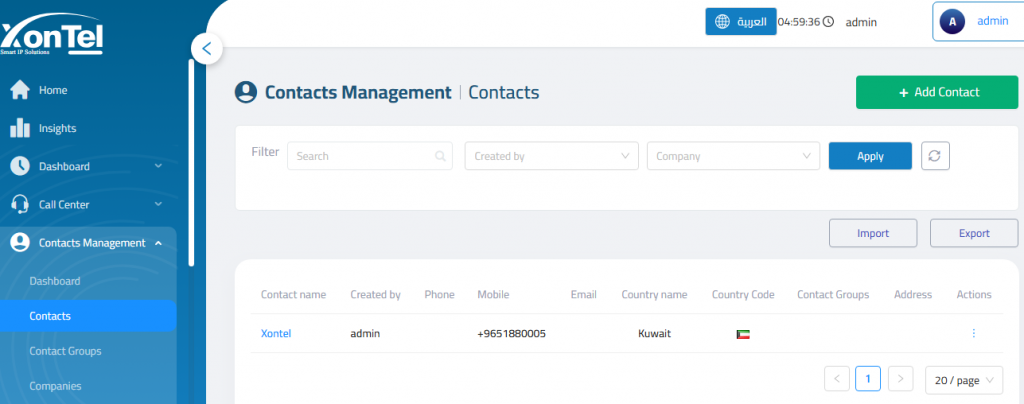
Add Contact
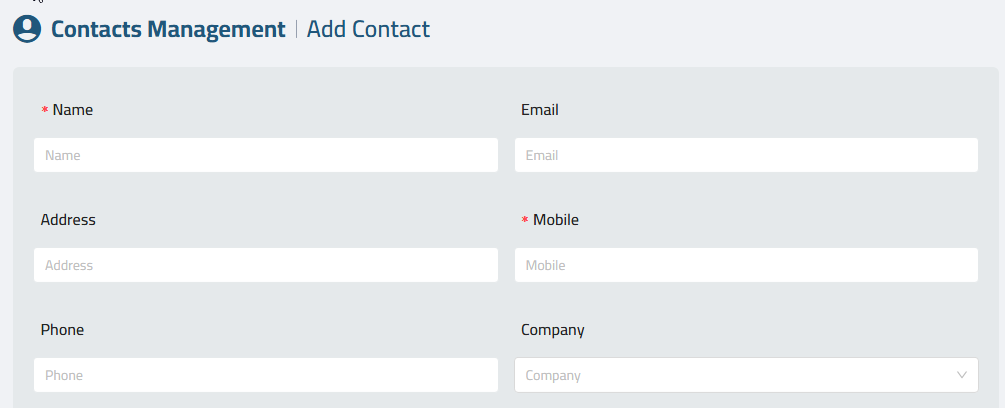
Name: Full name of the contact.

Email: Contact’s email address.

Address: Optional physical address.

Mobile: Mobile phone number.

Phone: Additional phone number (e.g., landline).

الشركة: Associated company (selectable from a predefined list).
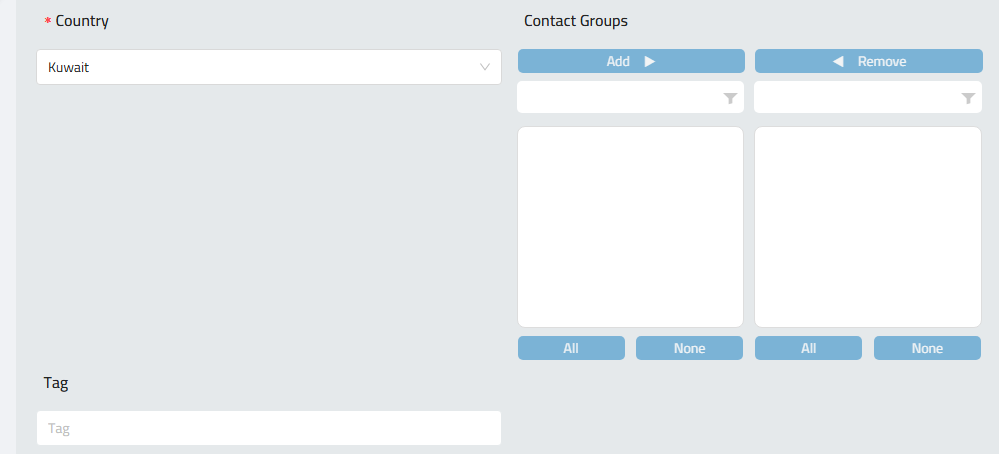
Country: Country of the contact (e.g., Kuwait).

Note: You can choose your default country from the system parameters.

Contact Groups: Assign contact to one or more groups via the Add/Remove interface.

Tag: Optional identifier or label for classification.
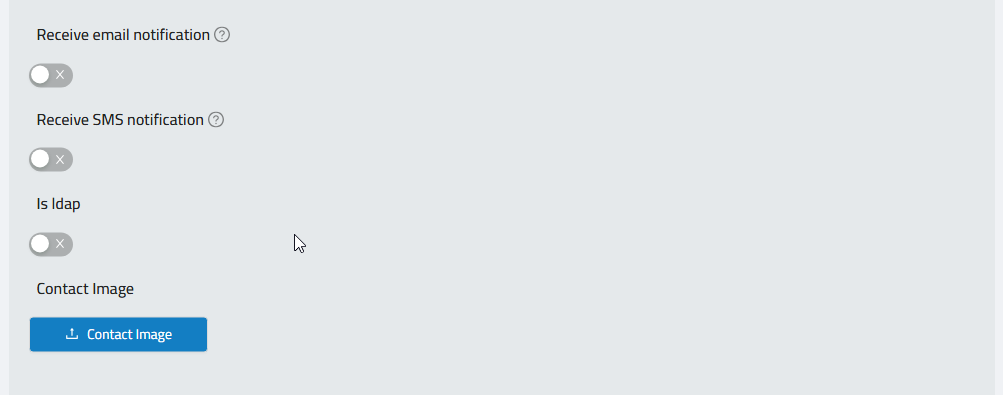
Receive Email Notification: Toggle to enable or disable email alerts for this contact.

Receive SMS Notification: Toggle to enable or disable SMS alerts.

Is LDAP: Marks the contact as being synced or linked with an LDAP directory.

Contact Image: Upload a profile image using the “Contact Image” button.

Was this helpful?

Yes  No

Didn't find your answer? تواصل معنا

Previously
Contacts Management
Up Next
Contact Groups
  • Copyright 2026 SmartWpThemes.com. All Rights Reserved