• XonTel Platform
    • XonTel PBX Manager
      • PBX V 1.X.X
        • Overview
          • Installation
            • PBX ISO Installation on ESXi
          • License Activation & Verification
          • Log in to the PBX
        • System
          • Authentication
            • Users
            • Groups
            • Permissions
          • Network
            • Network Interface
            • Network Routes
            • Network Host
            • Static Routes
            • Diagnostic Tools
          • Host Name
          • Email
          • Security
            • IP Tables
            • Fail2ban
          • Dynamic DNS
          • VPN
            • Open VPN
            • SSTP
          • Maintenance
          • LDAP
        • PBX
          • Extensions
          • Trunks
          • Call controls
            • Inbound Routes
            • Outbound Routes
            • Time Conditions
            • Auto CLIP
          • Call Features
            • IVR
            • Ring Group
            • Queue
            • Paging/Intercom
            • Blacklist
          • Voice Prompts
          • Music On Hold
          • NAT
          • Status
          • CDR
          • Feature Code
          • Recording Storage
          • Transport
        • Event Center
          • Session Timeout
          • Activity Log
      • PBX V 3.X.X
        • Overview
          • Installation
            • PBX ISO Installation on ESXi
          • First Login and Activation Steps
        • Dashboard
        • Extensions
        • Trunks
        • Queues
        • PBX Features
          • Call Features
            • IVR
            • Ring Group
            • Paging/Intercom
            • Blacklist
          • Call controls
            • Inbound Routes
            • Outbound Routes
            • Time Conditions
            • Auto CLIP
          • Feature Code
        • Voice & Audio
          • Voice Prompts
          • Music On Hold
          • System Sound Language
        • SIP Settings
          • NAT
          • Transport
        • System
          • Network
            • Network Interface
            • Network Routes
            • Network Host
            • Static Routes
            • Diagnostic Tools
          • VPN
            • Open VPN
            • SSTP
          • Dynamic DNS
          • SMTP Settings
          • Host Name
          • LDAP
          • Session Timeout
          • Storage
        • Security
          • Firewall
          • Fail2ban
        • Maintenance
          • Service Actions
          • Backup & Restore
        • Authentication
          • Users
          • Groups
          • Permissions
        • Advanced Settings
        • CDRs
        • Status
        • Audit Log
    • كول سنتر زونتل
      • Call Center V 1.X.X
        • Overview
          • Installation
          • Log in to the call center
          • License Activation & Verification
        • Dashboard
          • Agent Insights
          • Inbound calls
          • Outbound calls
          • My Dashboard
        • Call Center Management
          • Missed Call Actions
            • Missed Calls Actions History
            • Missed Call Actions
            • Missed Calls Actions Logs
          • Type of Break
          • Widgets
          • CDRs
          • CDR Survey Questions
          • Queues
          • Queue Logs
          • Queues Evaluation
          • Trunk
          • External Lookup
        • Contacts Management
          • Contacts
          • Contact Groups
          • Companies
          • Contact Custom fields
          • Customer Journey
        • Authentication
          • Users
            • Admin
            • Supervisor
            • Agent
          • Groups
          • Permissions
          • Add End User
        • Applications
          • Ticket Managements
            • Categories
              • Sub Categories
            • Create Ticket
            • Tickets List
            • Reminder Settings
            • Dashboards
            • Ticket Statistics
            • Tickets CCs
            • Follow Up
            • Custom Fields
            • Notifications Templates
            • Ticket Logs
          • SMS
            • SMS Message
            • Bulk SMS
            • SMS Templates
          • Email Management
            • Outgoing Emails
            • Incoming Emails
            • Attachments
            • Templates
            • Teams
          • Auto Dialer
            • Dial Teams
            • Auto Dialer Log
            • Auto Dialer Status
          • Web Chat
            • Dashboard
            • Offline Messages
            • Web Chat Logs
          • Queue Evaluation
            • Queues Evaluation Level
            • Queues Evaluation
          • Social Media
            • Social Media Teams
            • Social Media Sessions Tracker
            • WhatsApp
          • Agent Chat
        • Reports
          • Generate Reports
        • Settings
          • Site Administration
          • Email Settings
          • Email Channel Mailbox
          • Email Channel Outbox
          • Email Logger
          • Web Chat Settings
          • SMS Gateway
          • ODBC Settings
          • System Parameters
          • Updates
          • Https Certification
          • Web Phone Configuration
          • Web Logo Settings
          • End User Logo
        • Block
          • Blocked Word
          • Block Settings
        • Status
        • Session Control
        • Activity Log
      • Call Center V 3.X.X
        • Overview
          • Login to Call Center
        • Dashboard
          • Inbound Calls Dashboard
          • Outbound Calls Dashboard
          • My Dashboard
          • Agent Analytics Dashboard
        • Call Center Tools
          • Agent Status Logs
          • Call Tags
          • Missed Call Management
          • Custom Widgets
          • Type Of Break
          • External Lookup
        • Contacts
          • Contacts Dashboard
          • All Contacts
          • Contact Groups
          • Contact Tags
          • Companies
          • Custom Fields
          • Customer Journey
        • Applications
          • Tickets
            • Dashboard
            • All tickets
            • Categories
              • Subcategories
            • Ticket CC
            • Reminder Settings
            • Ticket Follow Up
            • Ticket Custom Fields
            • Notification Templates
            • Ticket Log
          • SMS
            • Dashboard
            • SMS Messages
            • Bulk SMS
            • SMS Templates
            • SMS Settings
          • قنوات البريد الإلكتروني
            • Dashboard
            • Outgoing Emails
            • Incoming Emails
            • Attachments
            • Email Templates
            • Teams
            • Mailbox Settings
            • Outbox Settings
          • Web Chat
            • Dashboard
            • Offline Messages
            • Web Chat Logs
            • Web Chat Settings
          • Block
            • Blocked Words
            • Block Settings
            • Block List
          • Auto Dialer
            • Auto Dialer
            • Dial Teams
            • Auto Dialer Log
            • Auto Dialer Status
          • Queue Evaluation
            • Evaluation Level
            • Queue Evaluation
          • Agent Chat
        • Settings
          • Site Administration
          • Email Settings
          • Email Logger
          • ODBC Settings
          • System Parameters
          • HTTPS Certification
          • Web Logo Settings
          • End User Logo
        • Authentication
          • Users
            • Agent
            • Supervisor
          • End User
        • Reports
        • Live Status
        • Session Control
    • Versions & Releases
      • v1.x.x
        • v1.1.x
        • v1.2.x
        • v1.3.x
        • v1.4.x
        • v1.5.x
        • v1.6.x
        • v1.7.x
        • v1.8.x
        • v1.9.x
        • v1.10.x
        • v1.11.x
      • v2.x.x
        • v2.0.X
          • v2.0.4
      • v3.x.x
        • v3.0.x
        • v3.1.x
        • v3.2.x
        • v3.3.x

Agent

5 views 0

Written by xontel_admin
سبتمبر 19, 2026

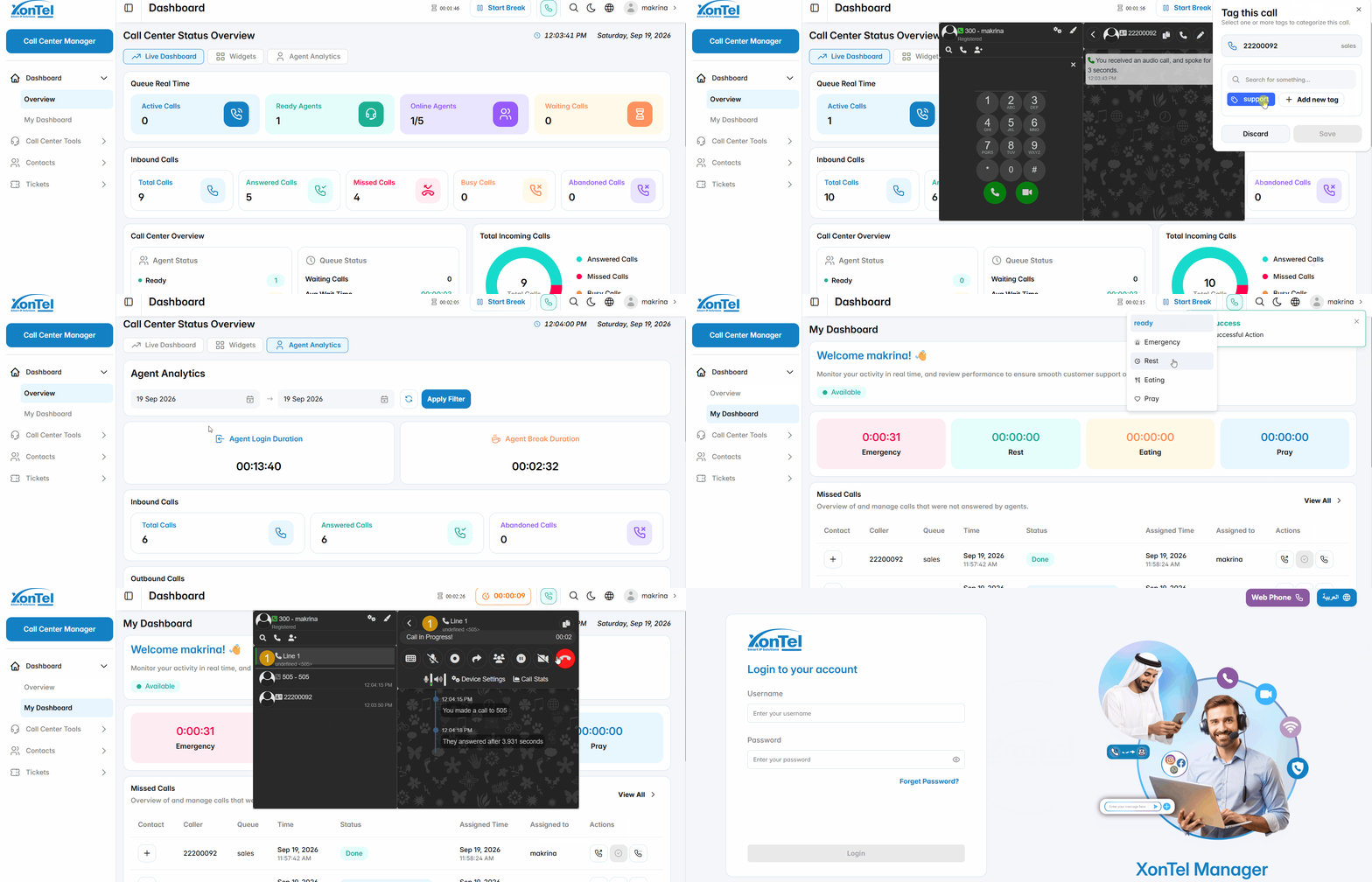
The Agent is a Call Center user who handles customer interactions through assigned queues. An agent can be configured with an extension and connected to different phone topologies, allowing calls to be handled using an IP Phone, Softphone, or Web Dialer. This provides flexibility for agents to handle calls from physical phones, desktop applications, mobile devices, or directly through the web browser.
Incoming Call Popup
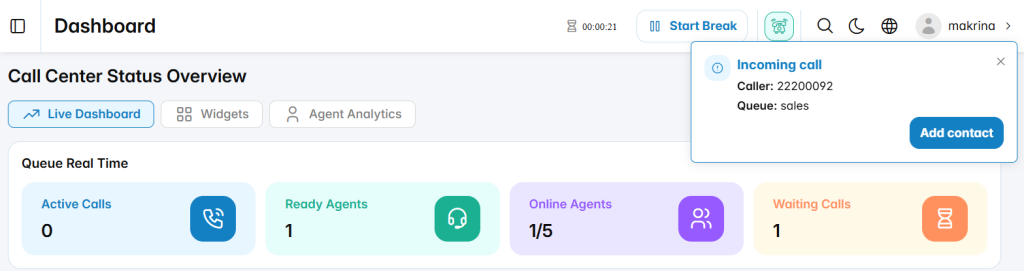
When a customer calls an agent’s assigned queue, an Incoming Call popup is displayed. The popup shows the caller’s number and the queue receiving the call. The agent can use the Add Contact option to add the caller as a contact when needed.

Call Tag Popup
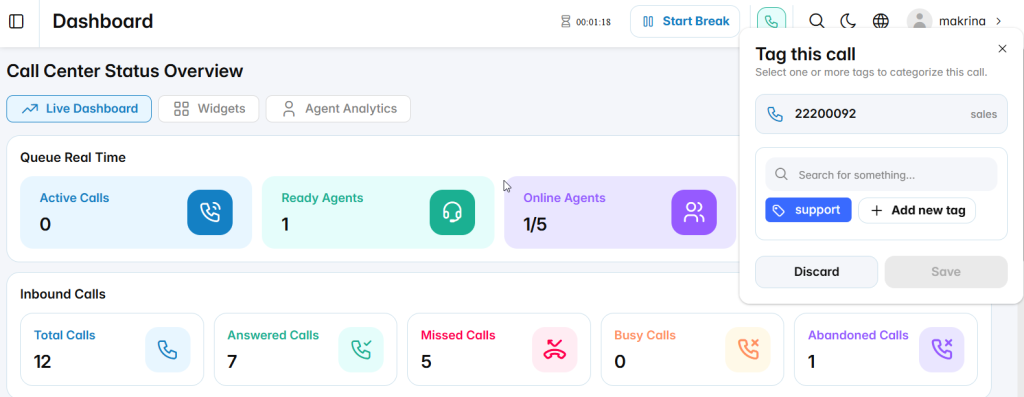
After the agent answers the call, the Tag this call popup can be displayed to categorize the interaction. The agent can select one or more existing tags or create a new tag using Add new tag. The selected tags can then be saved and associated with the call for classification and later reference.

Was this helpful?

Yes  No

Didn't find your answer? تواصل معنا

Previously
Users
Up Next
Supervisor
  • Copyright 2026 SmartWpThemes.com. All Rights Reserved