
The Session Control section is used to manage active agent sessions within the Call Center system. It allows administrators and supervisors to clear agent sessions or return agents from a break status to the Ready state.
This section helps administrators and supervisors resolve session issues, force agent logout when required, and restore agent availability for call handling.
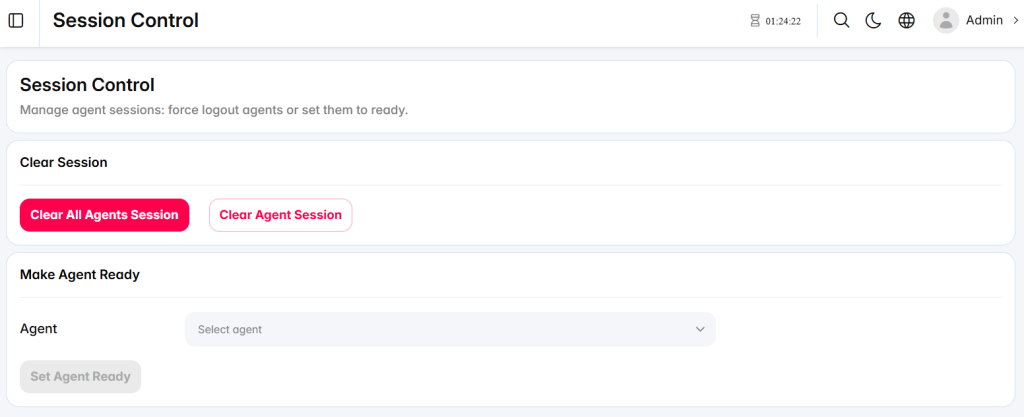
Clear Session
The Clear Session area allows administrators and supervisors to terminate active agent sessions.

Clear All Agents Session: Clears the sessions of all currently logged-in agents. A confirmation message is displayed before the action is completed.
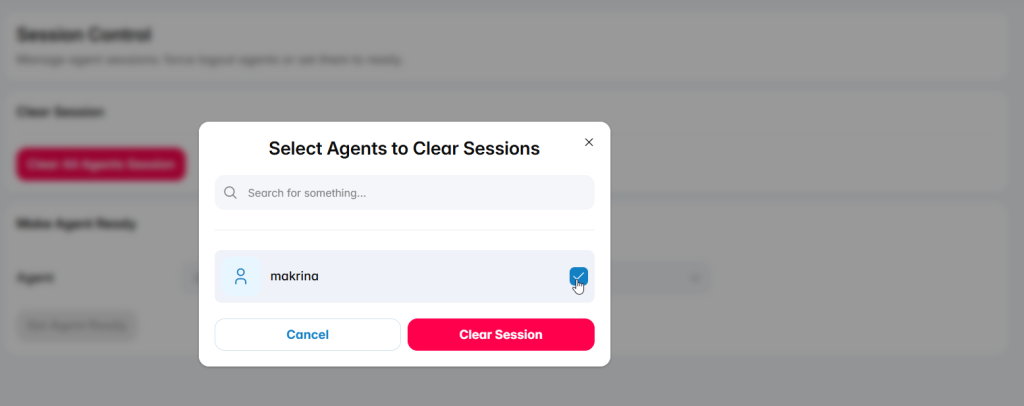
Clear Agent Session: Opens a list of agents and allows administrators and supervisors to select one or more agents whose sessions should be cleared.
Make Agent Ready
The Make Agent Ready area allows administrators and supervisors to return an agent from a break status to the Ready state.
Agent: Displays agents who are currently on break and allows administrators and supervisors to select the required agent.

Set Agent Ready: Changes the selected agent status to Ready. A confirmation message is displayed before the status is updated.