
The SSTP section is used to configure a Secure Socket Tunneling Protocol connection. SSTP allows the PBX system to connect securely to a remote VPN server using server details, authentication credentials, and interface settings.
Account Config
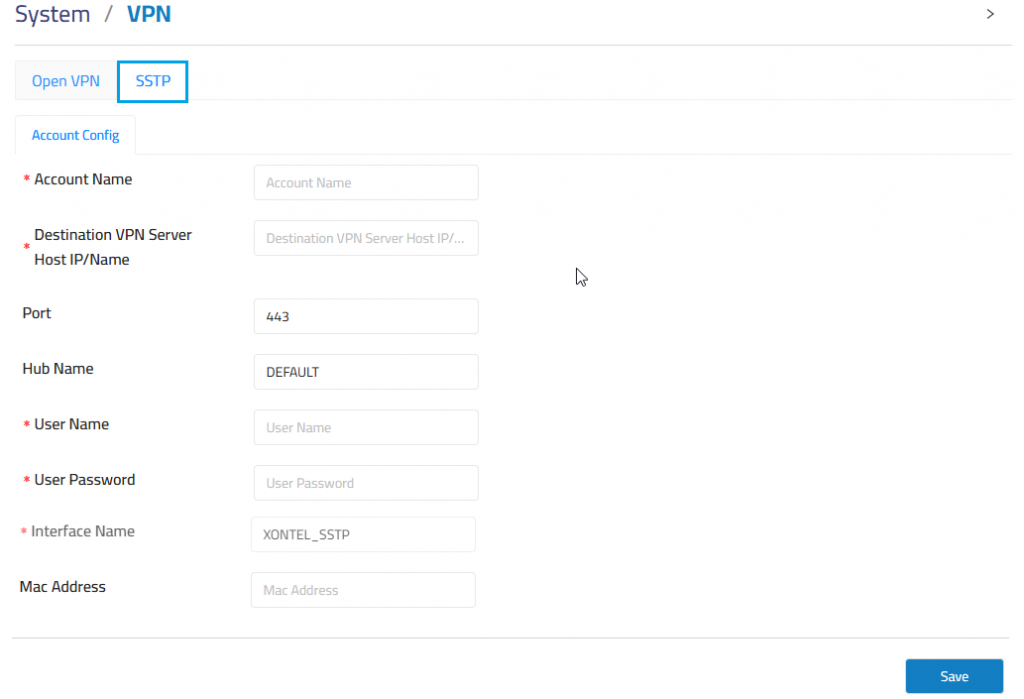
Account Name: Defines the SSTP account profile name.
Destination VPN Server Host IP/Name: Defines the remote VPN server address or hostname.
Port: Defines the VPN server port used for the SSTP connection.
Hub Name: Defines the VPN hub name used by the remote VPN server.
Username: Defines the username used for VPN authentication.
User Password: Defines the password used for VPN authentication.
Interface Name: Displays or defines the VPN interface name created for the connection.
Mac Address: Defines the MAC address when required by the VPN configuration.
Account Status
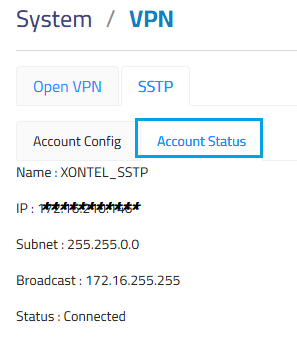
After filling in all the data and saving it, you can check the status and IP from Account Status.