
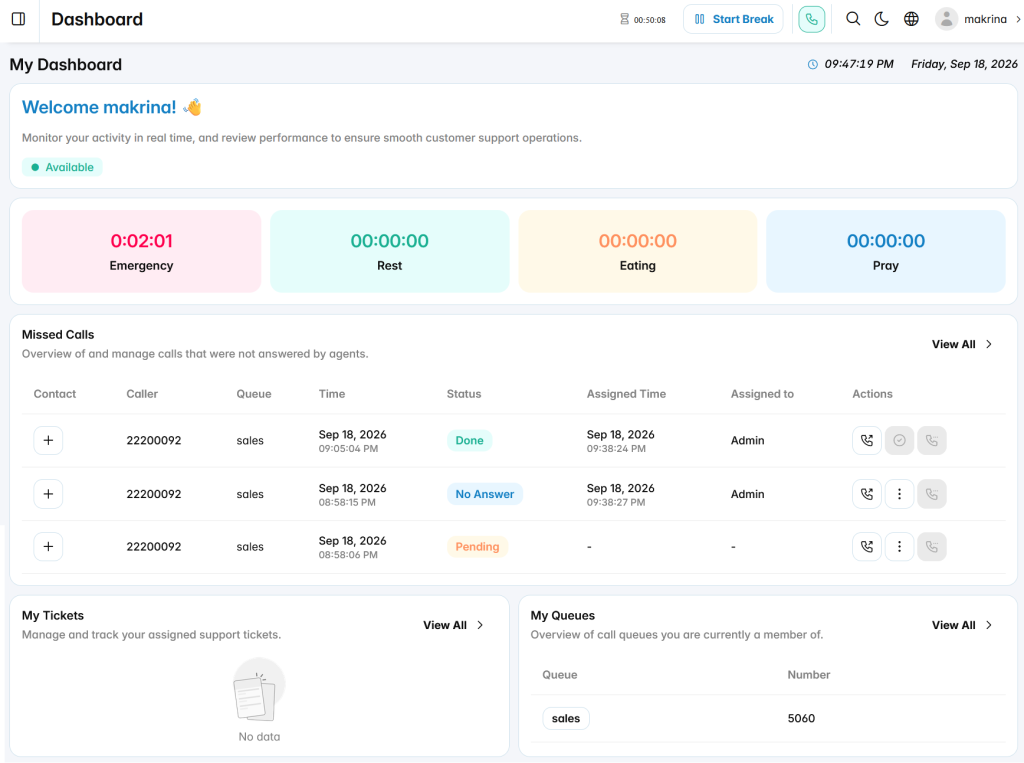
The My Dashboard provides agents with a personalized workspace to monitor their current status, manage customer interactions, and access assigned tasks from a single interface. It helps agents track their availability, handle missed calls, follow up on support requests, and view their queue assignments.
Agent Status
The Agent Status section displays the current availability status of the logged-in agent. Agents can view their current state and manage their availability for handling customer interactions.
Break Status
The Break Status section displays the duration of each break type, allowing agents to track their break usage, including:
- Emergency
- Rest
- Eating
- Pray
Agents can start and manage their breaks based on their availability requirements.
Missed Calls
The Missed Calls section provides an overview of unanswered customer calls assigned to the agent. It displays call details including:
- Contact: Displays customer contact information when available.
- Caller: Shows the caller number.
- Queue: Displays the queue where the call was received.
- Time: Shows the date and time of the missed call.
- Status: Indicates the current handling status of the missed call.
- Assigned Time: Displays when the call was assigned.
- Assigned To: Shows the user responsible for handling the missed call.
Agents can review missed calls and perform available actions to follow up with customers.
My Tickets
The My Tickets section displays support tickets assigned to the agent, allowing them to track and manage customer requests efficiently.
My Queues
The My Queues section provides an overview of the queues where the agent is a member, including queue names and numbers for quick access.