
The Agent Analytics Dashboard provides a complete overview of the agent’s activities across all enabled applications included in their license. It allows agents to monitor their performance, track daily activities, and review their interactions from a single centralized dashboard.
The dashboard displays agent-specific statistics and operational insights, including login activity, break duration, call performance, assigned tickets, queue participation, and other supported application activities.
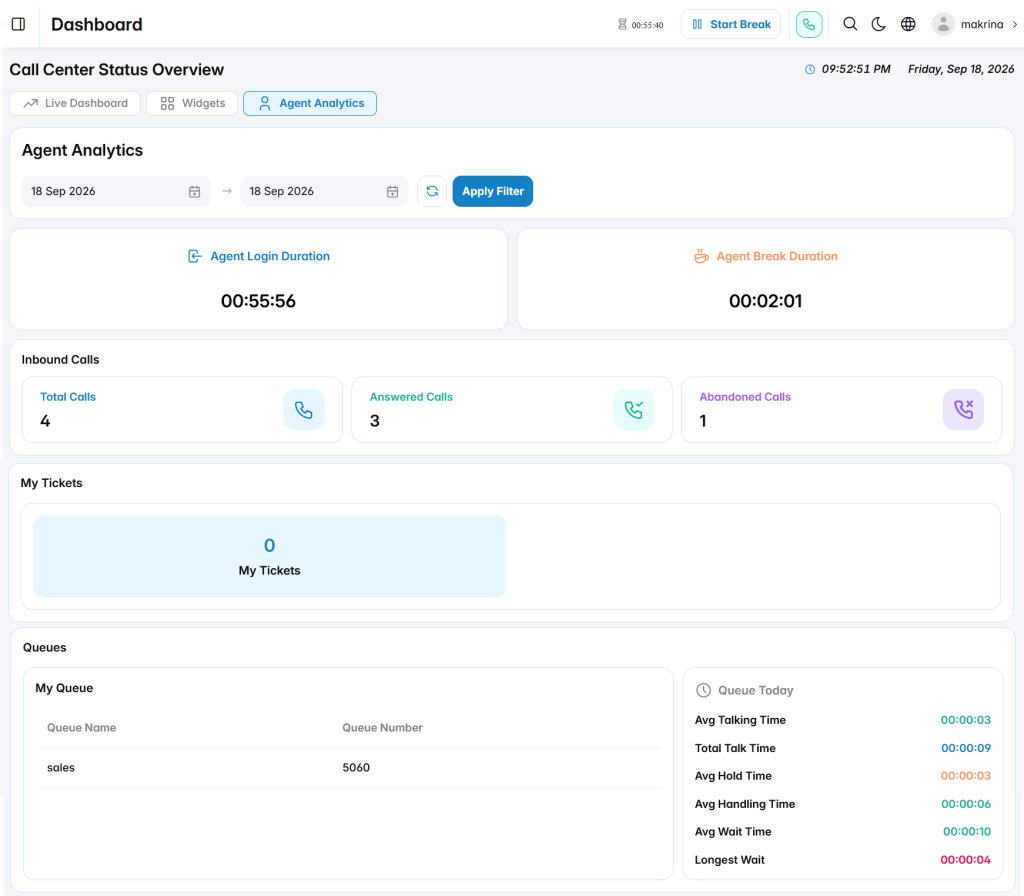
Agent Activity Summary
The Agent Activity Summary section provides key information about the agent’s working activity, including:
- Agent Login Duration: Displays the total time the agent has been logged in during the selected period.
- Agent Break Duration: Shows the total duration spent on breaks.
Call Activities
The Call Activities section provides an overview of the agent’s call performance, including:
- Total Calls: Displays the total number of calls handled by the agent.
- Answered Calls: Shows the number of successfully answered calls.
- Abandoned Calls: Displays the number of calls abandoned before being handled.
Ticket Activities
The My Tickets section displays the number of tickets assigned to the agent, allowing them to track their support workload and manage customer requests.
Queue Activities
The Queues section provides details about the queues assigned to the agent, including:
- Queue Name
- Queue Number
It also displays daily queue performance metrics, including:
- Average Talking Time
- Total Talk Time
- Average Hold Time
- Average Handling Time
- Average Wait Time
- Longest Wait Time