
The Email Dashboard provides a centralized overview of email communication activities across the platform. It enables administrators and supervisors to monitor incoming and outgoing emails, track email statuses, and analyze email usage based on users within a selected time period.
The dashboard allows filtering email activities by date range and users to review specific email performance and communication records.
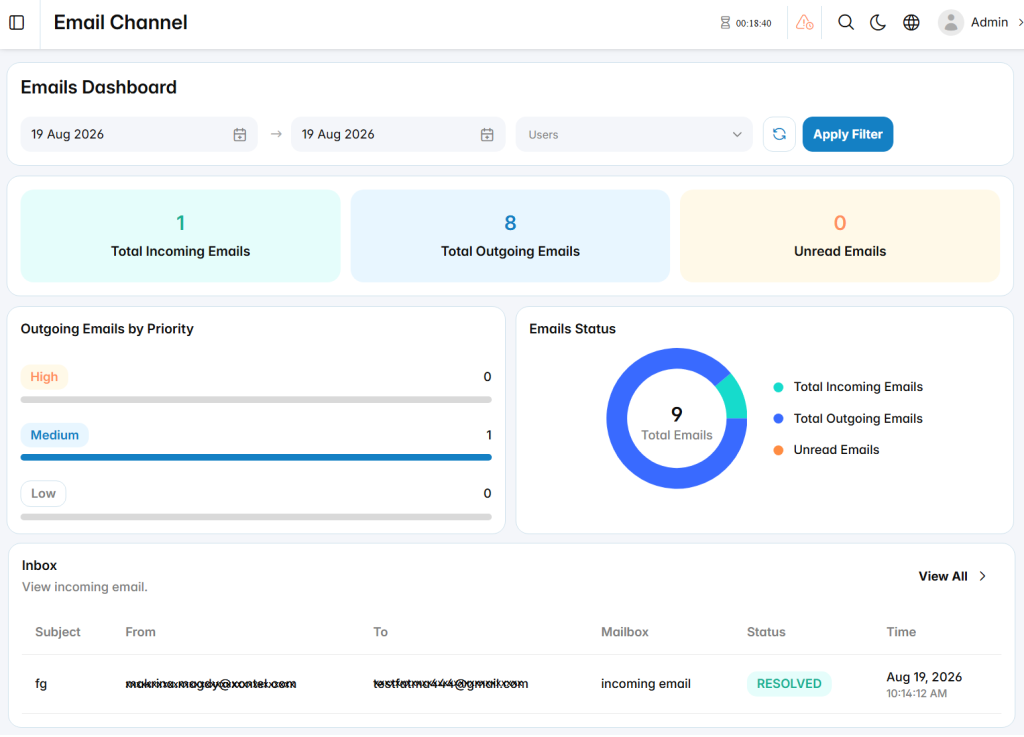
Email Summary
The Email Summary section displays key email statistics, including:
- Total Incoming Emails: Shows the total number of received emails during the selected period.
- Total Outgoing Emails: Displays the total number of emails sent from the system.
- Unread Emails: Indicates the number of incoming emails that have not been read yet.
Outgoing Emails by Priority
The Outgoing Emails by Priority section provides an overview of sent emails categorized by priority level, including:
- High Priority
- Medium Priority
- Low Priority
This helps monitor the distribution of outgoing emails based on their assigned importance level.
Email Status
The Email Status section provides a visual representation of email distribution, including incoming emails, outgoing emails, and unread emails, allowing administrators and supervisors to quickly understand overall email activity.
Inbox
The Inbox section displays recent incoming email records, including sender details, recipient information, mailbox, email status, and received time. It allows users to review email activities and access detailed email records.