
The Incoming Emails section is used to review and manage email messages received by the Call Center system. It allows users to monitor incoming messages, assign emails to users, track message status, review attachments, and access complete email details from a centralized management interface.
This section helps administrators and supervisors organize inbound email communication and ensure that incoming messages are reviewed and processed efficiently.
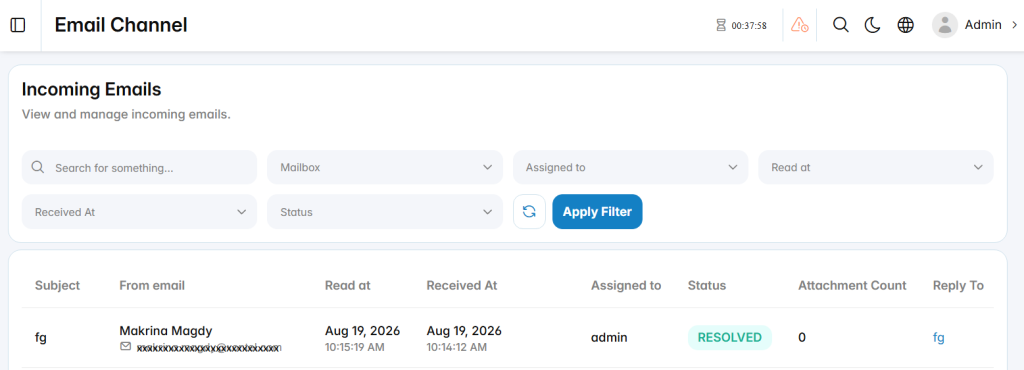
Incoming Email List
The incoming email list displays received messages and their key details.
Subject: Displays the email subject.
From Email: Displays the sender name and email address.
Read At: Displays the date and time when the email was read and replied.
Received At: Displays the date and time when the email was received.
Assigned To: Displays the user assigned to the incoming email after a reply is made.
Status: Displays the current email status, such as New or Resolved.
Attachment Count: Displays the number of attachments included with the email.
Reply To: Displays the related reply or email thread reference when available.
Actions: Provides additional options for managing or viewing the incoming email.
View Email Details
The View Email Details section is used to review the complete content and information associated with a selected incoming email.
Email Content
The email content area displays the message subject, sender information, recipient information, message body, signature, and previous conversation content when available.
Email Information
From Email: Displays the sender email address.
To Email: Displays the destination email address that received the message.
Mailbox: Displays the mailbox associated with the incoming email.
Received At: Displays the date and time when the email was received.
Assigned To: Displays the user assigned to manage the email.
Status: Displays the current processing status of the incoming email.
Quick Actions
Reply: Opens the reply interface for responding to the selected email.
Go to Incoming Emails: Returns to the Incoming Emails list.
Back: Returns to the previous section.