
The Mailbox Settings section is used to configure email mailboxes for receiving incoming messages within the Call Center system. It allows administrators to define mailbox connection details, enable or disable mailbox activity, configure archiving behavior, and assign mailboxes to specific email teams.
This section helps administrators manage inbound email channels and control which teams are responsible for handling messages received through each mailbox.
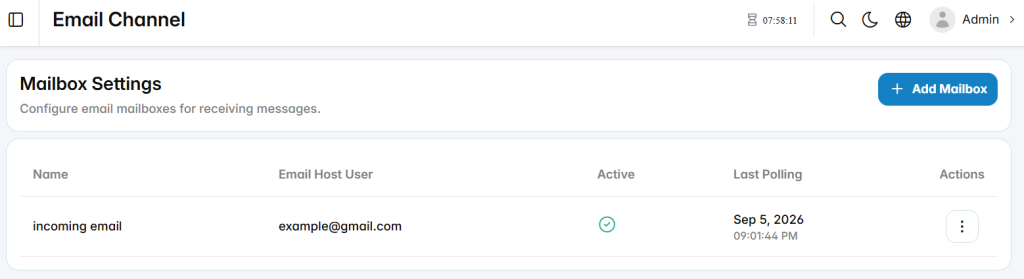
Add Mailbox
The Add Mailbox section is used to configure a new mailbox for receiving incoming email messages.
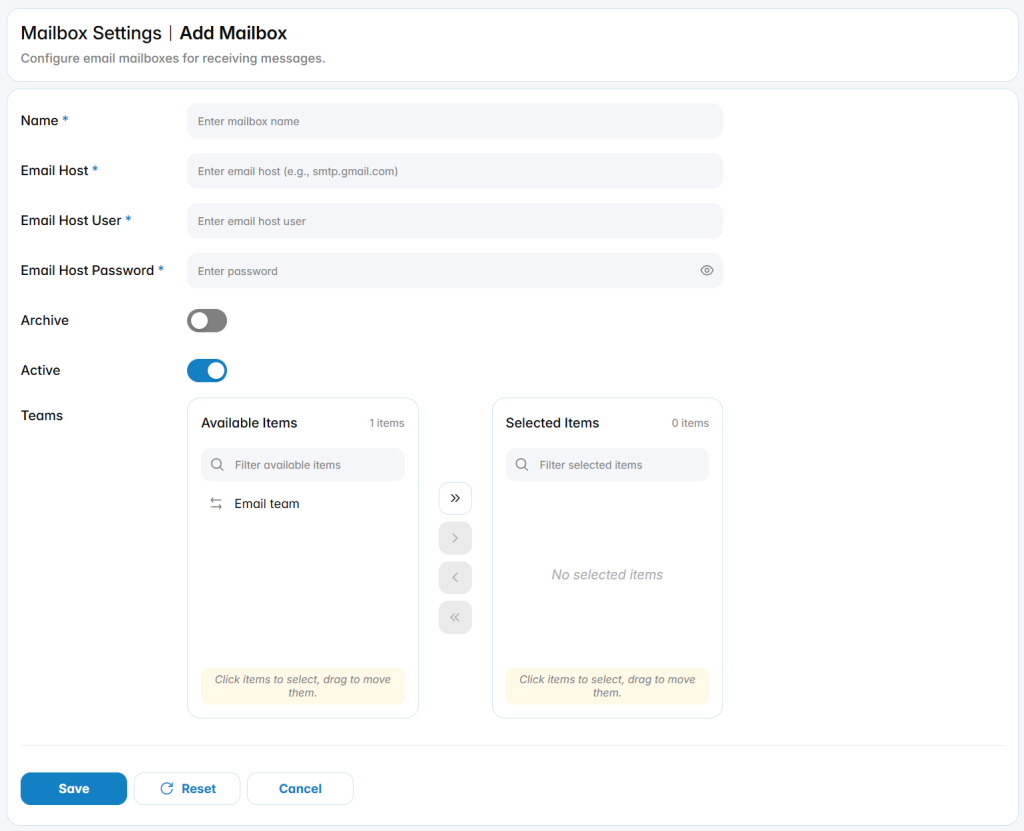
Name: Defines the name used to identify the mailbox.
Email Host: Defines the mail server address used to connect to the mailbox.
Email Host User: Defines the email account username used for mailbox access.
Email Host Password: Defines the password used to authenticate with the mailbox.
Archive: Enables or disables archiving behavior for messages handled through the mailbox.
Active: Enables or disables the mailbox for incoming email processing.
Team Assignment
The Teams area defines which email teams are associated with the mailbox.