
The Bulk SMS section is used to send SMS messages to multiple recipients at the same time. It allows users to create bulk SMS records, select recipients individually, by group or upload a numbers file, use SMS templates, and send messages through a configured SMS provider.
This section helps users manage large-scale SMS communication and monitor the status of bulk message delivery.
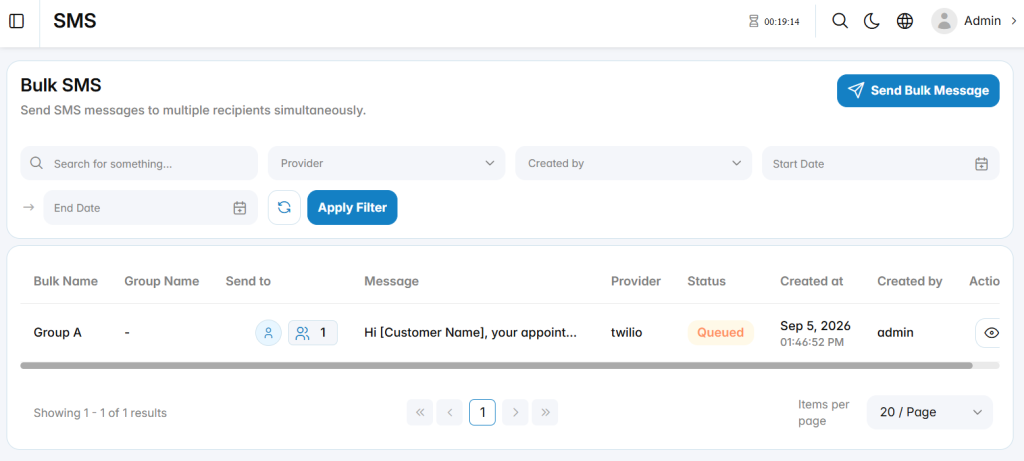
Send Bulk SMS
The Send Bulk SMS section is used to create and send an SMS message to multiple recipients. It allows users to define the bulk message name, select recipients, use contact groups or uploaded number lists, and choose the SMS provider.
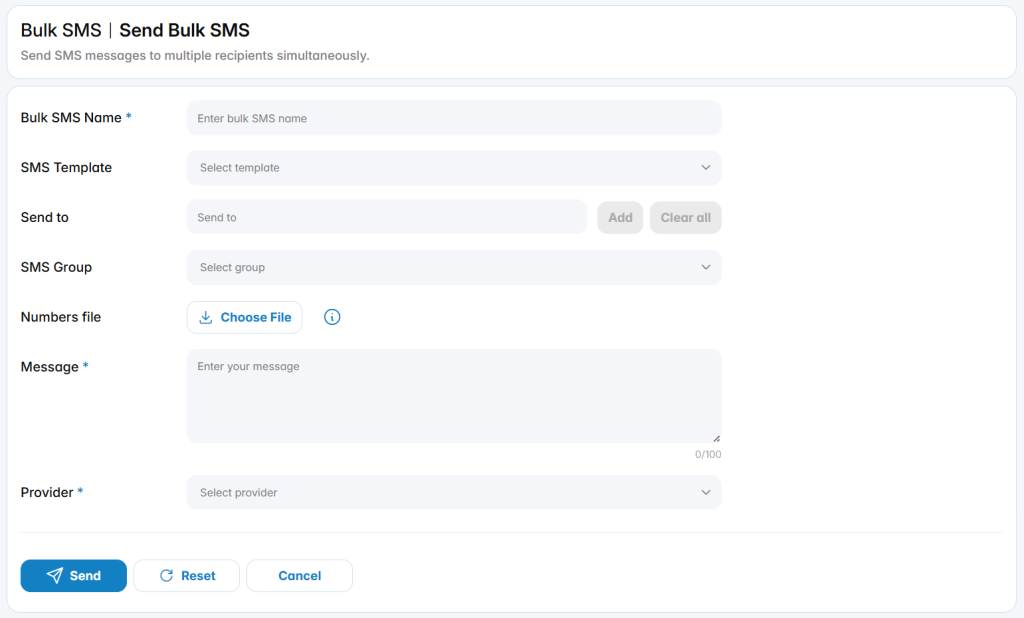
Bulk SMS Name: Defines the name used to identify the bulk SMS record.
SMS Template: Selects a configured SMS template to use as the message content.
Send To: Specifies individual recipients who should receive the SMS message.
SMS Group: Selects a configured contact group as the message recipient group.
Numbers File: Uploads a file containing phone numbers to include as recipients.
Message: Defines the SMS message that will be sent to the selected recipients.
Provider: Specifies the SMS provider used to send the bulk messages.